

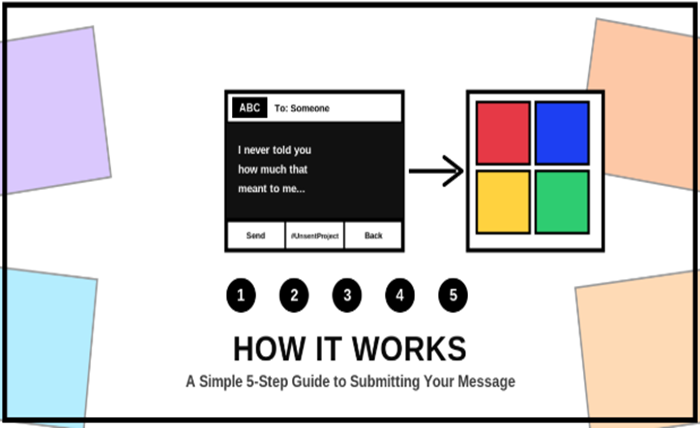
The Unsent Project only works because of one thing: it’s ridiculously easy to actually use. There’s no account to create, no email to verify, and no complicated form standing between you and the words you’ve been carrying around. You click Submit, you write what you never sent, you pick a color, and it’s out of your hands. That’s really the whole system — but if you’ve never done it before, it helps to know exactly what to expect before you start typing.
This guide walks through every step of submitting a message on The Unsent Project, from the moment you click the Submit button on the homepage to the second your message joins thousands of others in the archive.
Why The Unsent Project Keeps the Process So Simple
Before getting into the steps themselves, it’s worth understanding why the submission process looks the way it does. The entire idea behind The Unsent Project only works if people feel safe enough to be completely honest. The moment you add extra friction — account creation, email verification, a profile picture — people start editing themselves. They soften the message. They leave things out. They write for an audience instead of writing for themselves.
So The Unsent Project strips all of that away. No login. No username. No email required. Just a name (or initials, or nothing at all), a color, and a message. That simplicity is intentional, and it’s a big part of why the archive feels so raw and honest compared to almost anywhere else on the internet.
Step 1: Start From the Homepage and Click “Submit”
Every submission on The Unsent Project starts in the same place — the black “Submit” button in the top right corner of the homepage. Clicking it takes you straight to the submission page, where you’ll see a live preview of your message card on the left and a full color palette on the right. There’s nothing to sign up for and nothing to download. The page loads, and you’re ready to start writing within a few seconds.
If you’ve read our breakdown of where The Unsent Project actually came from, you already know this simplicity isn’t an accident — it’s baked into the concept from the very beginning, going all the way back to Rora Blue’s original version of the idea in 2015.
Step 2: Decide Who You’re Writing To
At the top of the submission card, you’ll see a field that says “Enter Name.” This is where you type who the message is for. It doesn’t need to be a full name — most people on The Unsent Project use a first name, a nickname, initials, or sometimes just a single letter if they want to stay extra vague. A few common examples people use here:
- A first name (“Sarah,” “James,” “Mum”)
- Initials only (“J.T.”)
- A relationship instead of a name (“My First Love,” “Dad,” “The Friend I Lost”)
- Something symbolic (“2019 Me,” “The One That Got Away”)
There’s no wrong answer here. The name field exists to give your message context, not to identify anyone — remember, nobody reading The Unsent Project will ever know who you or the recipient actually are.
Step 3: Write Your Message (You Have 250 Characters)
This is the heart of the whole process. The message box on The Unsent Project gives you 250 characters — roughly two to four short sentences — to say the thing you never said. That character limit isn’t there to restrict you; it’s there to force clarity. You don’t have room to over-explain or justify yourself. You just have room to say the actual thing.
If you’re staring at the blank box and not sure where to start, a few approaches tend to work well:
- Say the one sentence you keep rehearsing in your head. Whatever line you’ve replayed a hundred times but never said out loud — start there.
- Write it exactly like you’d say it in person. Don’t try to make it sound poetic or polished. The most powerful messages on The Unsent Project usually read like real speech, not literature.
- Address one specific moment. Instead of trying to summarize an entire relationship, focus on one memory, one conversation, or one thing you wish had gone differently.
There’s a live character counter under the box so you always know how much room you have left. If you go over, just trim a sentence — most messages on The Unsent Project actually land well under the 250-character limit anyway.
Step 4: Pick a Color That Matches the Feeling
Once your message is written, the next step is choosing a color from the palette on the right side of the page. This part goes all the way back to how The Unsent Project started — Rora Blue’s original question was literally “what color do you think of when you picture your first love?” That same logic still drives the color picker today.
There’s no rulebook for which color means what, but people tend to gravitate toward certain choices instinctively:
- Red — passion, anger, a love that burned too fast or too hot
- Blue — sadness, longing, an ache that lingers
- Black — grief, finality, something that’s truly over
- Yellow — nostalgia, warmth, good memories mixed with loss
- Green — jealousy, growth, or sometimes just “this is complicated”
- Purple or pink — tenderness, softness, first-love innocence
Don’t overthink this step. The color is meant to be an instinct, not a decision. Whatever color your gut reaches for first is almost always the right one.
Step 5: Agree to the Terms and Hit Send
Right below the message card, there’s a small checkbox: “I agree to the terms of submission.” This exists to keep The Unsent Project a safe space for everyone — it confirms you understand your message will be posted publicly (though anonymously), and that it shouldn’t include anything that identifies a real person against their will, like a full name, phone number, or other private details.
Once that box is checked, the “Send” button at the bottom of the card becomes active. Click it, and your message joins the archive alongside thousands of others. There’s no waiting period, no approval email, and nothing else you need to do. From the moment you clicked Submit to the moment your message goes live usually takes less than two minutes, start to finish.
What Happens After You Submit?
Once your message is sent, it becomes part of the public Unsent Project archive, appearing in the message grid alongside everyone else’s. Depending on how the site is set up, new submissions may go through a quick moderation check first — mainly to catch anything that includes real identifying information or violates the community guidelines — but in most cases, your message appears within moments.
From there, it lives exactly like every other message on the site: searchable, anonymous, and permanent. Someone, somewhere, might read it years from now and feel exactly what you felt when you wrote it. That’s really the entire point of The Unsent Project — your specific moment becomes something a total stranger can recognize in their own life too.
Tips for Writing a Message That Actually Feels Honest
If you want your submission to feel as real as possible — for your own sake, not for anyone else’s — a few small habits make a big difference:
Write it in one sitting. The messages that feel most honest on The Unsent Project are usually written quickly, in one pass, without much editing. The longer you sit and rewrite, the more you tend to soften or overthink what you actually meant.
Don’t perform for an audience. It’s tempting to write something clever or quotable once you know strangers will read it. But the messages that resonate most are the ones that clearly weren’t written to impress anyone — they were written because the person needed to get it out.
Say the specific thing, not the general thing. “I miss you” is honest, but “I still remember the blue jacket you wore the last time I saw you” is unforgettable. Specific details make a 250-character message feel like a whole story.
It’s okay if it’s ugly. Not every unsent message is gentle or poetic. Some of the most-read entries on The Unsent Project are angry, blunt, or even a little cruel — because that’s honestly how the writer felt in that moment. You’re allowed to be exactly as messy as the feeling actually is.
Is It Really Anonymous?
Yes. The Unsent Project doesn’t ask for your email, your real name, your location, or any account information at all. The name field is for the recipient of your message, not for you, and it’s entirely optional what you put there. Nobody browsing the site — including us — can trace a submission back to the person who wrote it. That anonymity is exactly what makes it possible to write things here that most people would never say anywhere else.
Common Questions About Submitting to The Unsent Project
Can I submit more than one message?
Yes. There’s no limit on how many messages you can submit to The Unsent Project. Some people write one and never come back. Others return every time something new comes up that they need to get off their chest. Both are completely normal ways to use the site.
Can I edit or delete a message after I’ve sent it?
Once a message is submitted to The Unsent Project, it becomes part of the public archive and generally can’t be edited afterward, since there’s no account tied to it that would let you log back in and find it. This is exactly why it’s worth taking a moment to read your message once before hitting send — not to overthink it, just to make sure it says what you actually mean.
What if I want to write to more than one person?
Submit a separate message for each person. The Unsent Project is built around one message, one recipient, one color at a time — it keeps every entry focused and readable instead of turning into a long list of unrelated thoughts.
Does it cost anything to submit?
No. Submitting a message to The Unsent Project is completely free, and always will be. There’s no premium tier, no paywall, and no ads standing between you and the submission box.
Can I use it on my phone?
Yes — the submission page is built to work just as well on mobile as it does on desktop. The card preview, color palette, and character counter all resize automatically, so you can write and submit an unsent message whether you’re at your laptop at 2 a.m. or standing in line somewhere with your phone in your hand.
A Few Things to Avoid When Submitting
The Unsent Project works because it’s a safe space, and keeping it that way depends on everyone following a few basic guidelines. When you’re writing your message, try to avoid including anything that could identify a real person against their wishes — full names, phone numbers, social media handles, addresses, or other private details. The whole point of the anonymity is that it protects both the writer and the person the message is about.
It’s also worth remembering that while The Unsent Project welcomes raw, honest, even angry messages, there’s a difference between expressing a real feeling and writing something designed purely to harass or target someone. Most people never come close to this line, but it’s part of the terms of submission for a reason — it keeps the archive a place people can trust.
Ready to Write Yours?
If you’ve been carrying around a sentence you’ve rewritten in your head a hundred times, this is your sign to finally put it somewhere. Click Submit, choose who it’s for, write the 250 characters that say what you actually mean, pick the color that matches it, and let it go.
And if you’re curious about how this whole idea started in the first place, take a look at the full story behind The Unsent Project — it explains exactly why a simple color-and-message format turned into one of the most quietly powerful communities on the internet.

No comments yet. Be the first to share your thoughts!